|
Vehicle Markings
|
SPACE MARINE SQUAD INSIGNIA
Since Games Workshop doesn't produce decals large
enough to cover the sides or top of Space Marine
Rhinos, the process listed out below should help
you achieve the desired look. These ideas can also
be applied to scenery (in the form of large graffiti
on walls). Preparation
Complete the highlighting and shading of the entire
model before you paint the icon. If you plan on
putting battle-damage on the model, finish all of
the following steps for the large script before
you start painting on the dust, muck, scorch-marks,
and scratches. Set the model aside to dry entirely
before you add the script.
|
|
| Step
1 |
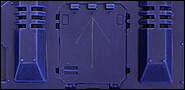
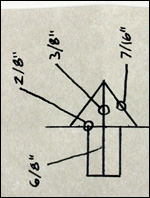 Next,
take a sharpened pencil with a soft lead (2B
or lower will work best, as harder leads may
scratch the painted surface) and lightly draw
out the design that you wish to paint. If
you are working over a dark color, use a white
charcoal pencil (these tools are available
at most art supply or craft stores). Next,
take a sharpened pencil with a soft lead (2B
or lower will work best, as harder leads may
scratch the painted surface) and lightly draw
out the design that you wish to paint. If
you are working over a dark color, use a white
charcoal pencil (these tools are available
at most art supply or craft stores).
Be sure to use an old paintbrush or tissue
to whisk any graphite dust away from the model
before you start painting. Excess graphite
dust will dull and discolor your paint. It
also helps if you start by drawing the Squad
Insignia out on a piece of paper first. By
doing so, you will get a chance to practice
and work out the specifics of the design.
|
|
|
|
|
|
Click
on the images to see larger versions.
|
| Step
1a |
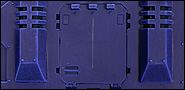
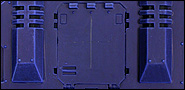
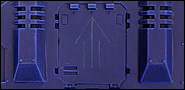
Draw a line starting 1/16"
below the center rivet on the top of the Rhino
door. End the line ~3/16" away from the bottom
edge of the door. |
| Step
1b |
Draw a 1/4" horizontal line
on either side of the original vertical line to
form a cross. |
| Step
1c |
Draw two diagonal
lines down from the top of the vertical line
to each end point of the horizontal line drawn
in Step 1b.
|
|
|
|
|
|
Click on
the images to see larger versions. |
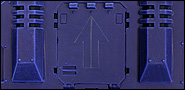
| Step 1d |
Draw two vertical
lines down from horizontal line from Step
1b. These lines should be parallel to the
central line and cut the horizontal line into
quarters.
|
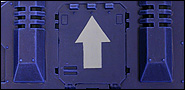
| Step 1e |
Finish the Squad
Insignia by closing off the base of the arrow
with another horizontal line.
Now you are ready to fill in the lines with color.
|
| Step 2 |
Paint over the pencil
lines with thinned-down Skull White mixed
with Fortress Grey (2:1). Test the consistency
of the paint before applying it to the model.
If the paint is too thin, it will lose its opacity.
If it’s too thick, it will make your design
lumpy and obscure the detail. You can test the
paint on an old model or a bit of primed sprue
if you like. When painting the design, make
sure to cover the pencil lines completely with
the paint.
This first layer provides a good layer on
which to paint the pure Skull White, as just
Skull White tends to have a hard time covering
over dark colors – especially when thinned
with water. |
|
| Step 3 |
Once the first
coat of paint dries, go back in with straight
thinned-down Skull White and paint over the
previous layer. If you’d like, try to
leave a thin area of the Skull White/Fortress
Grey mix showing through along one side of
the icon. This step will create more depth.
|
|
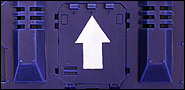
|
Finishing
up
If you need to, go back in with the color you used as
a basecoat on your vehicle and clean up any rough insignia
edges. Of course, the key is to paint the Squad Insignia
as neatly as possible, especially over a drybrushed
coat. If you clean up the Insignia, the basecoat will
stand out against the drybrushed surface. |
|
|